Showing posts with label HTML. Show all posts

Wednesday, July 25, 2007

Cognos 8 College Dashboard

Here's another example of a dashboard (or should I rather call it a scorecard?), developed by me using a Cognos 8 dimensionally modeled framework and Report Studio.

It is used by the management of an educational center to easily and quickly view the current status of the key performance indicators of the organization. Of course, the numbers used in this picture are entirely fictitious (albeit not unrealistic!).
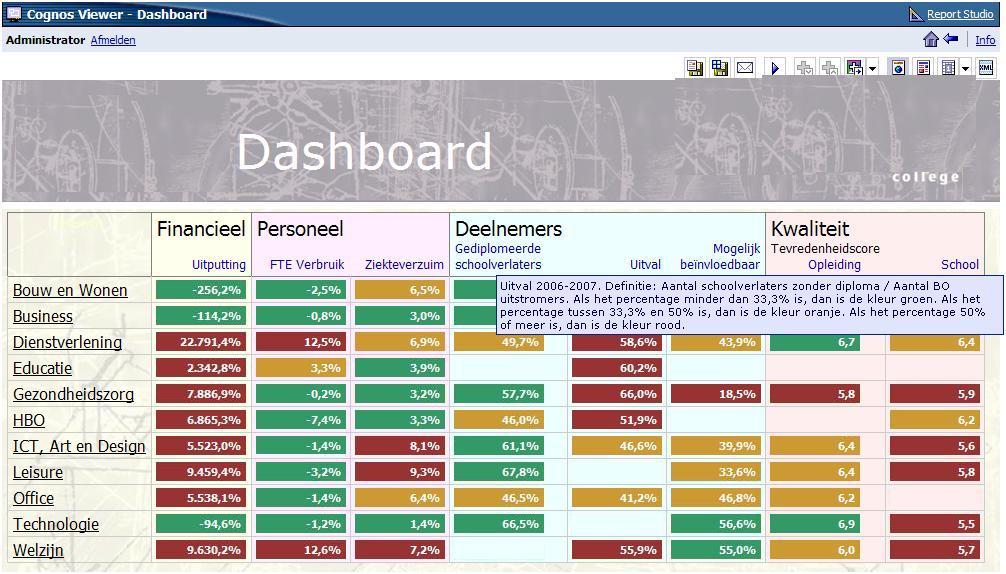

Feature highlights:
  • The framework consists of multiple dimensionally modeled star schema's, each with it's own regular dimensions. Common regular dimensions (i.e. the organization dimension) are related through relationships from each fact query subject to one central organization query subject.
  • The report makes use of multiple master-detail relationships. The organization dimension is used in the master query, and is linked to each organization level query item in the detail query. In the report example, most columns displayed are from separate detail lists. So the master query delivers the drill down capability through the organization, and the detail queries deliver the indicator information.
  • Coloring of the indicators is done by using conditional style variables.
  • When the mouse cursor is on one of the blue indicator names, a blue popup tooltip window appears containing both dynamic and static information. This is built by creating a report expression in an HTML item. The HTML item is an anchor tag <a> using the onmouseover attribute and some JavaScript code. Many thanks to Walter Zorn for sharing this piece of JavaScript! The report expression looks like this:

'<a onmouseover="Tip(''Uitval ' + [Detail Deelnemers BO uitstroom].[Schooljaar o.b.v. Specfieke peildatum] + '. Definitie: Aantal schoolverlaters zonder diploma / Aantal BO uitstromers. Als het percentage minder dan 33,3% is, dan is de kleur groen. Als het percentage tussen 33,3% en 50% is, dan is de kleur oranje. Als het percentage 50% of meer is, dan is de kleur rood.'')">Uitval</a>'

Tuesday, January 30, 2007

Implementing a navigation path

The Dashboard application, as of I blogged before, contains a navigation path ('kruimelpad' in Dutch).

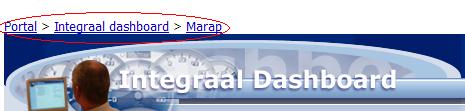
The navigation path is a series of one or more hyperlinks showing the path of reports a user has run from the Portal via the Dashboard down to the Monthly reports ('Marap') and the Trend graph reports.

The path is presented as one line in the top of the report and looks like this:


Each hyperlink in the navigation path consists of an HTML item object in the report. The '>' signs are just text item objects.

The HTML item contains an anchor tag calling the browser's page history and skipping a number of pages back.

For instance the link to 'Marap' looks like this, calling the history two pages back (-2):

<a href="#" onclick="history.go(-2);return false;">Marap</a>

Why two pages back and not one? Well, when Cognos executes a report, it will show an intermediate page "Your report is running." as long as the report is not ready and you're waiting for it. This page needs to be skipped when navigating back, so I don't go back one page but two.

In case of the prior run reports 'Integraal dashboard' and 'Portal', the same code is used, but instead of -2, the number of pages back is -4 and -6 respectively.

The main drawback of this technique is that Cognos does not show this page when the report can be run very quickly, so in that case the history call should be only one page back. For this potential issue, I have not found a solution yet.

I don't want the report to be re-run, as this is not user friendly in my opinion. By the way, a re-execution of the prior report would be possible using the following code:

<script language="javascript">
function exit()
{
document.formWarpRequest.method.value = 'release';
document.formWarpRequest.m.value = 'portal/report-viewer-release.xts';
setTimeout("document.formWarpRequest.submit()", 1);
}
</script>
<a class="ccOptions" href="javascript:exit()">Marap</a>

If someone knows of a way to elimininate the intermediate "Your report is running." page, please let me know! Cognos offers no solution for this as fas as I know.

Monday, January 29, 2007

How to automatically select the first prompt value

In the dashboard application I blogged about in the previous post, I now have added a prompt in the main portal report page showing the current period. When a new year arrives, the users often don't just want to see the few actual details if the new year, but also want to look back into the details of last year. This requirement calls for a prompted list of values.

Here is a screenshot of the actual prompt (red circle). The first value ('2007 t/m januari') is automatically selected. Mind there is NO prompt page! This is the first 'report' page that is presented to the user.


In Cognos it is possible to provide a Default Selection but this contains a list of static values. I cannot use this a each month there is another first value to be selected. So what I've created is a Value Prompt object presenting its values by a query with Use Values and Display Values, and have added an HTML item with a piece of JavaScript that selects the first value. The HTML item is added just after the Value Prompt object.

The JavaScript code in the HTML items looks like this:

<script type="text/javascript">
function init()
{

if

(document.formWarpRequest._oLstChoicesPeriode.options[3].selected == false)

{

if

(document.formWarpRequest._oLstChoicesPeriode.options[2].selected == false)

{

document.formWarpRequest._oLstChoicesPeriode.options[2].selected = true;

listBoxPeriode.autoSubmit();

}

}
}
</script>
<body onLoad=init()>


The first value to be selected in the list is actually the second value in the list object, which JavaScript sees as a list of three values in total. If no value is selected initially (third and second selections are false), the second value is selected by the script.

Tip: Did you know that the Cognos role "Consumers" needs to be given read permission to the Report Studio capability "HTML Items in Report" in order to get HTML item objects working in reports for Consumers? Please mind this and check the Tools > Capabilities in Cognos Connection!